
Work Text:
Features
This is not a lightweight skin; it themes virtually every area of Ao3 in some way. With that in mind, here are some major features!
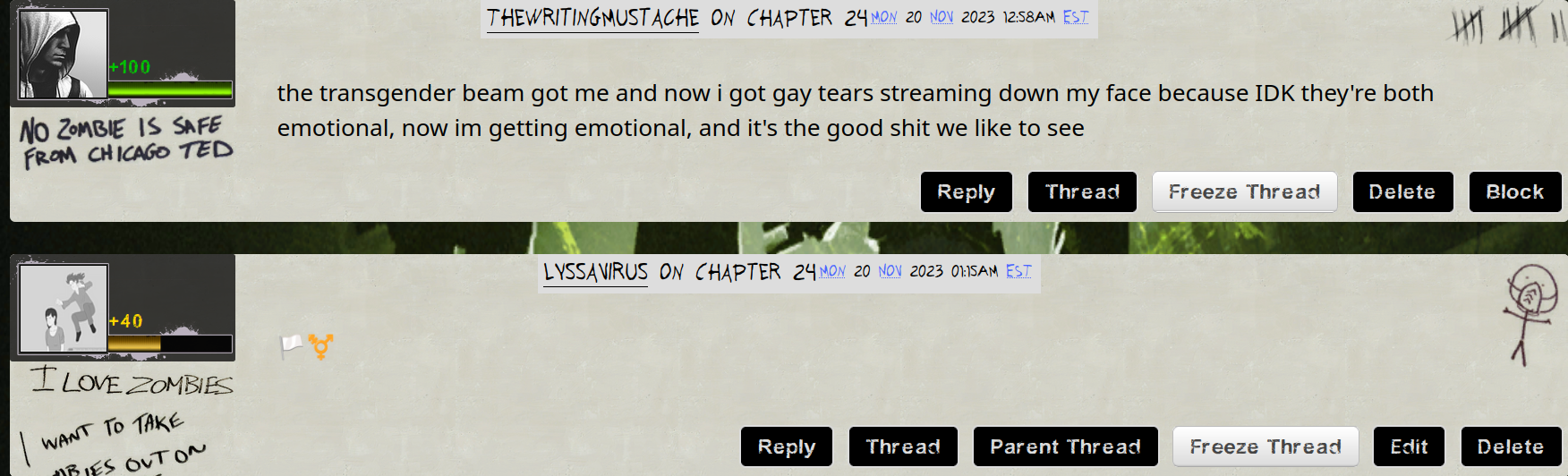
- "Saferoom graffiti"-style comments and inbox mail and health bar UIs for comment and inbox icons
- A fun new site header! Just wait and see.
- Campaign poster-style blurbs for works!
- Campaign selection frame-style image borders. [Edit: Removed for breaking some elements. Supported for item embeds in my L4D work skin, though.]
- Canon character tags in the color of their ingame subtitles, for both the survivors and special infected!
- CEDA flyer help modules and tooltip site tips and required messages.
Patch log:
If you have installed this skin and are encountering an issue, please read this to see if it has already been resolved, and if not, leave a comment on this work!
- 09/02/23 Fixed an error with Coach's subtitle-colored character tag.
- 09/04/23 Added image borders, in the same style as the "campaign selection frame" blurb headers.
- 09/04/23 Cleaned up the formatting of this meta work a bit.
- 09/06/23 Shortened the margin between main tag blurbs.
- 09/06/23 Fixed certain boxes on edit works and a couple other locations appearing as solid white.
- 11/20/23 Fixed some coloration and visibility issues on user profiles and statistics.
- 11/23/23 Addressed some crowding issues in replies to comments. Replies now have no margin, but are distinguished by a yellow "+40" icon health bar. Attempting for a later update to change background for replies as well.
- 06/11/25 Rehosted every image in this skin, as they were originally hosted via discord.
Instructions to create and use the skin
This is important! If you will be using this skin for mobile at all, you must go through the steps to add the mobile parent skin, or else a lot will be broken and borderline unusable on small screens. If you will be using for desktop solely you can feel free to use only the main skin.
Creating the parent skin:
The first thing that needs to be done is to create a site skin with the mobile fix CSS. Go to your dashboard, and select the button on your side menu that says "Skins". From there, you will want to click "Create Skin". For skin type, select "site skin". Title the skin something recognizable, such as "L4D site skin mobile fixes". Then copy all of the code found here into the body. On "Advanced Options" hit "Show". The only setting here you need to worry about is Media, where you will check the box for "only screen and (max-width: 42em)". It should look like this.

Hit "Submit" and step 1 should be done!
The main skin:
Step two is to create the main portion of the skin and add the mobile fixes as the parent skin! Return to "Skins" on your dashboard, and create a second site skin. Title this something recognizable as well, such as "L4D site skin". Once again, you'll be selecting "Site skin" in the dropdown. Copy all of the code found here into the body. If you won't be on mobile at all, hit submit now and the skin will be good to go. Otherwise, show "Advanced Options" again. This time, the category you want is "Parent Skins". In the selection box, begin to type and then select whatever you titled your mobile fix skin, and then press "Add Parent". This should look something like this.

Hit submit again, and the skin creation is done!
The theme fonts:
Note that this skin was designed to use two text fonts from the Left 4 Dead games, Future Rot and Stubble Bold, to look exactly as intended, and one more open text font, Moinho, for the headings of the graffiti-styled comments and inbox. Those can be found in this folder, but are optional, and the skin will function fine without them. To use them, simply download, and then once they are downloaded, click on them and press “Install” in the window that appears with the example text.
Using the skin:
You're almost done! The last step is simply to go to the "Skins" tab of your dashboard again, where you should see the blurbs for your mobile fix skin and the main skin. Click "Use" on the main skin, and that will select the skin to use!
Here are, without spoiling a couple of the fun easter eggs, some preview images of the skin on desktop!



...And on mobile!


